
问答模块
项目目标
本项目旨在构建一个功能完备的 RAG(Retrieval-Augmented Generation)系统,主要目标包括:
- 知识库管理:支持创建、更新和删除知识库,便于用户高效维护内容。
- 文档处理:包括文档的拆分、片段的向量化处理,以提升检索效率和准确性。
- 问答系统:提供高效的向量检索和实时生成回答的能力,支持复杂汇总类问题的处理。
- 系统优化:通过统计分析和推理问答调试,不断优化系统性能和用户体验。
系统核心概念
在 RAG 系统中,以下是几个核心概念:
- 应用:知识库的集合。每个应用可以自定义提示词,以满足不同的个性化需求。
- 知识库:由多个文档组成,便于用户对内容进行分类和管理。
- 文档:系统中对应的真实文档内容。
- 片段:文档经过拆分后的最小内容单元,用于更高效的处理和检索。
功能实现步骤
数据库设计 查看 01.md
设计并实现项目所需的数据表结构与数据库方案,为后续的数据操作打下坚实基础。用户登录 查看 02.md
实现了安全可靠的用户认证系统,保护用户数据并限制未经授权的访问。模型管理 查看 03.md
支持针对不同平台的模型(如 OpenAI、Google Gemini、Claude)进行管理与配置。知识库管理 查看 04.md
提供创建、更新及删除知识库的功能,方便用户维护与管理文档内容。文档拆分 查看 05.md
可将文档拆分为多个片段,便于后续向量化和检索操作。片段向量 查看 06.md
将文本片段进行向量化处理,以便进行语义相似度计算及高效检索。命中率测试 查看 07.md
通过语义相似度和 Top-N 算法,检索并返回与用户问题最相关的文档片段,用于评估检索的准确性。文档管理 查看 08.md
提供上传和管理文档的功能,上传后可自动拆分为片段便于进一步处理。片段管理 查看 09.md
允许对已拆分的片段进行增、删、改、查等操作,确保内容更新灵活可控。问题管理 查看 10.md
为片段指定相关问题,以提升检索时的准确性与关联度。应用管理 查看 11.md
提供创建和配置应用(智能体)的功能,并可关联指定模型和知识库。向量检索 查看 12.md
基于语义相似度,在知识库中高效检索与用户问题最匹配的片段。推理问答调试 查看 13.md
提供检索与问答性能的评估工具,帮助开发者进行系统优化与调试。对话问答 查看 14.md
为用户提供友好的人机交互界面,结合检索到的片段与用户问题实时生成回答。统计分析 查看 15.md
对用户的提问与系统回答进行数据化分析,并以可视化图表的形式呈现系统使用情况。用户管理 查看 16.md
提供多用户管理功能,包括用户的增删改查及权限控制。API 管理 查看 17.md
对外提供标准化 API,便于外部系统集成和调用本系统的功能。存储文件到 S3 查看 18.md
将用户上传的文件存储至 S3 等对象存储平台,提升文件管理的灵活性与可扩展性。文档解析优化 查看 19.md
介绍与对比常见的文档解析方案,并提供提升文档解析速度和准确性的优化建议。片段汇总 查看 20.md
对片段内容进行汇总,以提升总结类问题的查询与回答效率。文档多分块与检索 查看 21.md
将片段进一步拆分为句子并进行向量检索,提升检索的准确度与灵活度。多文档支持 查看 22.md
兼容多种文档格式,包括.doc,.docx,.xls,.xlsx,.ppt,.pptx等。对话日志 查看 23.md
记录并展示对话日志,用于后续分析和问题回溯。检索性能优化 查看 24.md
提供整库扫描和分区检索等多种方式,进一步提高检索速度和效率。Milvus 查看 25.md
将向量数据库切换至 Milvus,以在大规模向量检索场景中获得更佳的性能与可扩展性。文档解析方案和费用对比 查看 26.md
对比不同文档解析方案在成本、速度、稳定性等方面的差异,为用户提供更加经济高效的选择。爬取网页数据 查看 27.md
支持从网页中抓取所需内容,后续处理流程与本地文档一致:分段、向量化、存储与检索。
api 接口
打开问答页面例如http://127.0.0.1:3000/ui/chat/abe8055668fb480f会发送下面的请求和得到下面的响应 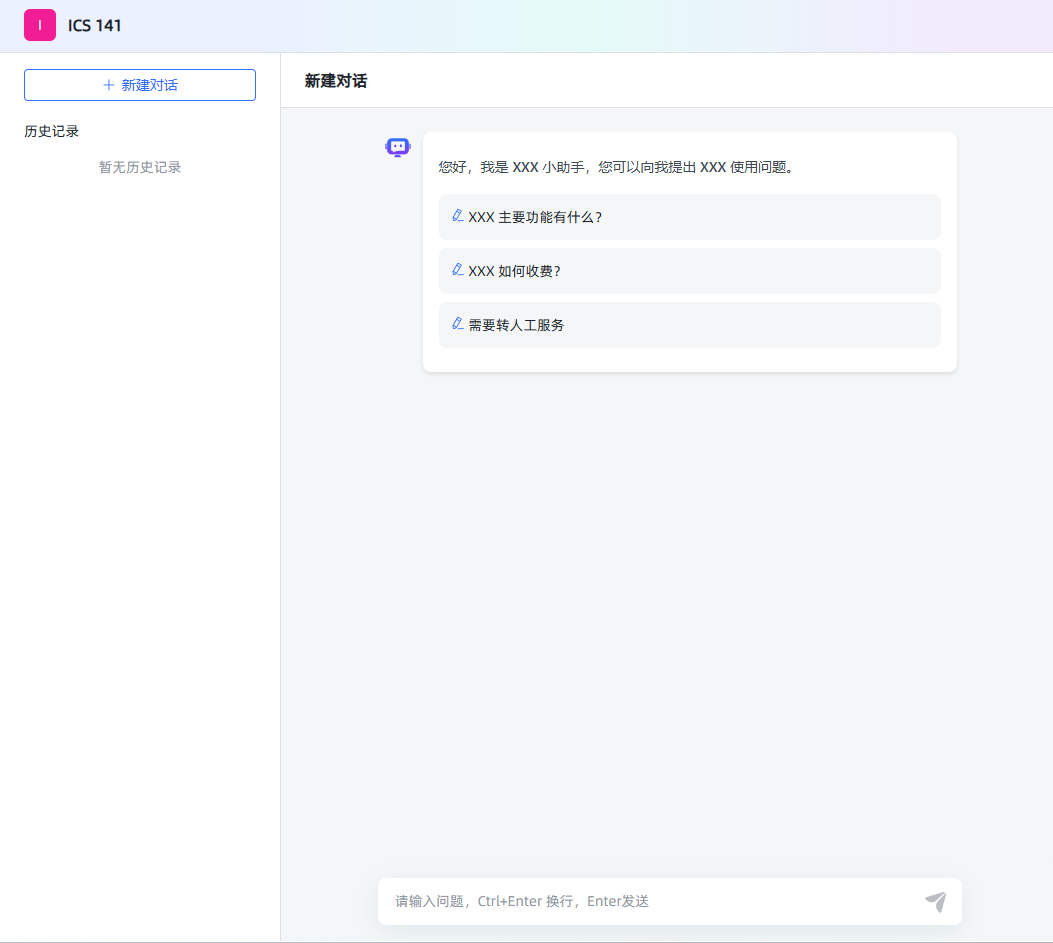
profile
GET /api/profile
{
  "code": 200,
  "message": "成功",
  "data": {
    "version": "v1.7.0 (build at 2024-10-31T12:49, commit: 44b3aed5)",
    "IS_XPACK": false,
    "XPACK_LICENSE_IS_VALID": false
  }
}
authentication
- 1.验证前端传递的 短 token 是否合法,
- 2.如果合法创建长 token 并返回,创建 client
- 3.如果浏览器传递时是长 token,解析长 token,判断用户是否存在,如果不存在,重复步骤 2,如果存在直接返回长 token
POST /api/application/authentication
header
authorization:eyJhcHBsaWNhdGlvbl9pZCI6Ijc3NzNiNjY4LTlmM2QtMTFlZi04MjI0LTAyNDJhYzExMDAwNSIsInVzZXJfaWQiOiJmMGRkOGY3MS1lNGVlLTExZWUtOGM4NC1hOGExNTk1ODAxYWIiLCJhY2Nlc3NfdG9rZW4iOiJhYmU4MDU1NjY4ZmI0ODBmIiwidHlwZSI6IkFQUExJQ0FUSU9OX0FDQ0VTU19UT0tFTiIsImNsaWVudF9pZCI6IjhkNTc5ZmY0LWQ2MzItMTFlZi05ZDkxLTAyNDJhYzExMDAwNSIsImF1dGhlbnRpY2F0aW9uIjp7fX0:1tZPaz:Mt0Ncr-U6YHSo_0G7V271HwWL8o6RyVr4HNh610FDo4
post
{ "access_token": "abe8055668fb480f" }
{
  "code": 200,
  "message": "成功",
  "data": "eyJhcHBsaWNhdGlvbl9pZCI6Ijc3NzNiNjY4LTlmM2QtMTFlZi04MjI0LTAyNDJhYzExMDAwNSIsInVzZXJfaWQiOiJmMGRkOGY3MS1lNGVlLTExZWUtOGM4NC1hOGExNTk1ODAxYWIiLCJhY2Nlc3NfdG9rZW4iOiJhYmU4MDU1NjY4ZmI0ODBmIiwidHlwZSI6IkFQUExJQ0FUSU9OX0FDQ0VTU19UT0tFTiIsImNsaWVudF9pZCI6ImIyMTJiMDJjLWQ2MGEtMTFlZi04NjVhLTAyNDJhYzExMDAwNSIsImF1dGhlbnRpY2F0aW9uIjp7fX0:1tZKmf:fkqrwQpjDRRs9-vHnhT7RKOKcRwTGwz3Yi6NC7xucHM"
}
1.浏览器在 local storage 中存储的 accessToken 用户 chat 页面聊天 2.浏览器在 local storage 中存储的 token 后台管理页面
application/profile
验证通过后 调用 application/profile 获取应用的信息
- 1.从请求中获取 token,解析 token 中的 id (拦截器会自动进行)
- 2.查询表获取应用 id
- 3.返回应用信息
GET /api/application/profile authorization:{上面获取的 token}
{
  "code": 200,
  "message": "成功",
  "data": {
    "id": "7773b668-9f3d-11ef-8224-0242ac110005",
    "name": "ICS 141",
    "desc": "ics 141 课程助手",
    "prologue": "您好,我是 XXX 小助手,您可以向我提出 XXX 使用问题。\n- XXX 主要功能有什么?\n- XXX 如何收费?\n- 需要转人工服务",
    "dialogue_number": 1,
    "icon": "/ui/favicon.ico",
    "type": "SIMPLE",
    "stt_model_id": null,
    "tts_model_id": null,
    "stt_model_enable": false,
    "tts_model_enable": false,
    "tts_type": "BROWSER",
    "work_flow": {},
    "show_source": false,
    "multiple_rounds_dialogue": true
  }
}
GET /api/application/7773b668-9f3d-11ef-8224-0242ac110005/chat/client/1/20
{
  "code": 200,
  "message": "成功",
  "data": {
    "total": 0,
    "records": [],
    "current": 1,
    "size": 20
  }
}
开启回话
客户端调用 GET /api/application/{application_id}/chat/open 接口时,服务端为此次会话生成了一个新的会话标识(这里返回的是 chat_id,如 "c2c9530c-d60b-11ef-865a-0242ac110005")。此时,虽然主要返回的是会话 ID,但服务端内部可能已经初始化了与该会话关联的各类信息,包括生成一个唯一的客户端标识。
get /api/application/7773b668-9f3d-11ef-8224-0242ac110005/chat/open
{
  "code": 200,
  "message": "成功",
  "data": "c2c9530c-d60b-11ef-865a-0242ac110005"
}
问答
POST /api/application/chat_message/c2c9530c-d60b-11ef-865a-0242ac110005
{"message":"when is the office hours","re_chat":false,"form_data":{}}
response event response 和项目的相同
get /api/application/7773b668-9f3d-11ef-8224-0242ac110005/chat/client/1/20
{
  "code": 200,
  "message": "成功",
  "data": {
    "total": 1,
    "records": [
      {
        "id": "c2c9530c-d60b-11ef-865a-0242ac110005",
        "application_id": "7773b668-9f3d-11ef-8224-0242ac110005",
        "abstract": "when is the office hours",
        "client_id": "b212b02c-d60a-11ef-865a-0242ac110005"
      }
    ],
    "current": 1,
    "size": 20
  }
}
开发接口
InterceptorConfiguration
InterceptorConfiguration 开放/api/profile
package nexus.io.maxkb.config;

import nexus.io.annotation.AConfiguration;
import nexus.io.annotation.Initialization;
import nexus.io.maxkb.inteceptor.AuthInterceptor;
import nexus.io.tio.boot.http.interceptor.HttpInteceptorConfigure;
import nexus.io.tio.boot.http.interceptor.HttpInterceptorModel;
import nexus.io.tio.boot.server.TioBootServer;

@AConfiguration
public class InterceptorConfiguration {

  @Initialization
  public void config() {
    AuthInterceptor UserTokenInterceptor = new AuthInterceptor();
    HttpInterceptorModel model = new HttpInterceptorModel();
    model.setInterceptor(UserTokenInterceptor);

    model.addBlockUrl("/**");

    model.addAllowUrls("", "/");
    model.addAllowUrls("/ui/**");
    model.addAllowUrls("/register/*", "/api/login/account", "/api/login/outLogin", "/api/user/login");
    model.addAllowUrl("/sse");

    model.addAllowUrls("/api/application/chat_message/*", "/api/profile","/api/application/authentication");

    HttpInteceptorConfigure configure = new HttpInteceptorConfigure();
    configure.add(model);

    TioBootServer.me().setHttpInteceptorConfigure(configure);
  }
}